A non-native file format is a file type that iOS cannot open without a dedicated third-party software. Examples include various CAD formats or… Microsoft PowerPoint.
Microsoft uses a proprietary file formats and does not allow third-party apps to fully render them.
Crescendo automatically converts PowerPoint presentations to PDF for display, but this method has limitations. To correctly display more advanced elements, such as transitions, animations, and embedded media the file must be opened in Microsoft PowerPoint.
The good news is that you can still use Crescendo as a single place for all your files and open non-native formats directly from Crescendo using compatibile third party apps, such as Microsoft Powerpoint or a CAD viewer.
Here is how:
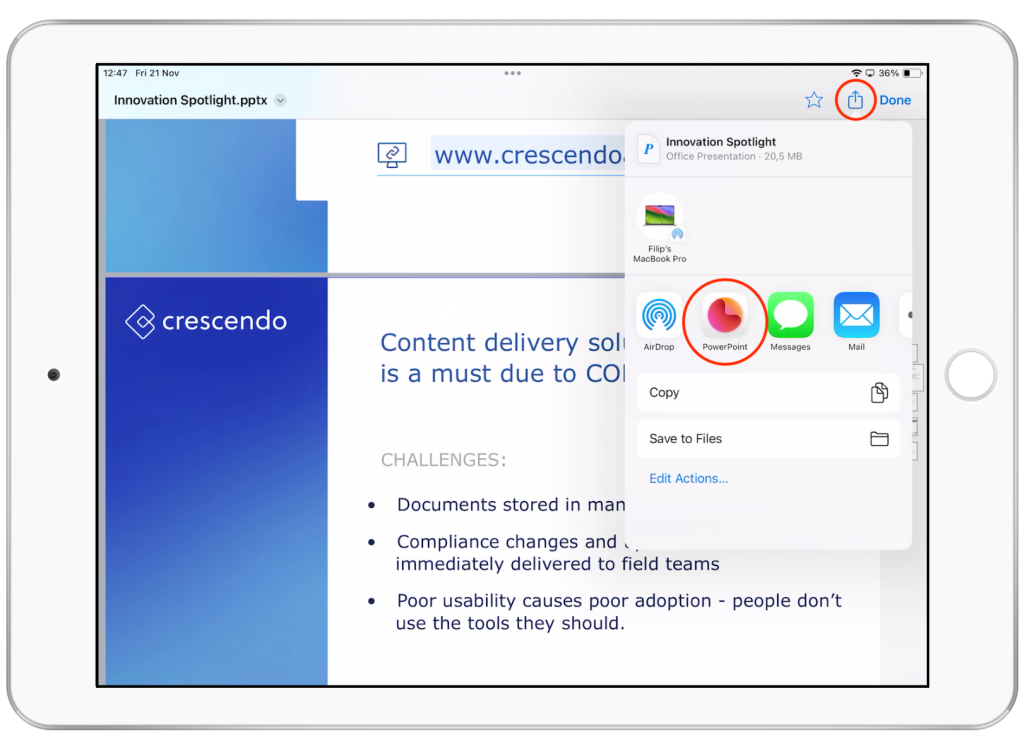
- Make sure the compatibile third party app (i.e. Powerpoint) is installed on your device
- Tap a file in Crescendo to open it
- Tap Share button and choose your relevant third party app
Your Crescendo file will be opened in the third party app. You can now run your presentation or sales conversation. When you're done, simply close the third party app. Your Crescendo file will stay unaffected by any changes you've made in the file using external software.